


MOVA Login – Access Your Cashback Account
Welcome Back to MOVA – The Trusted Platform for 100 Million Users
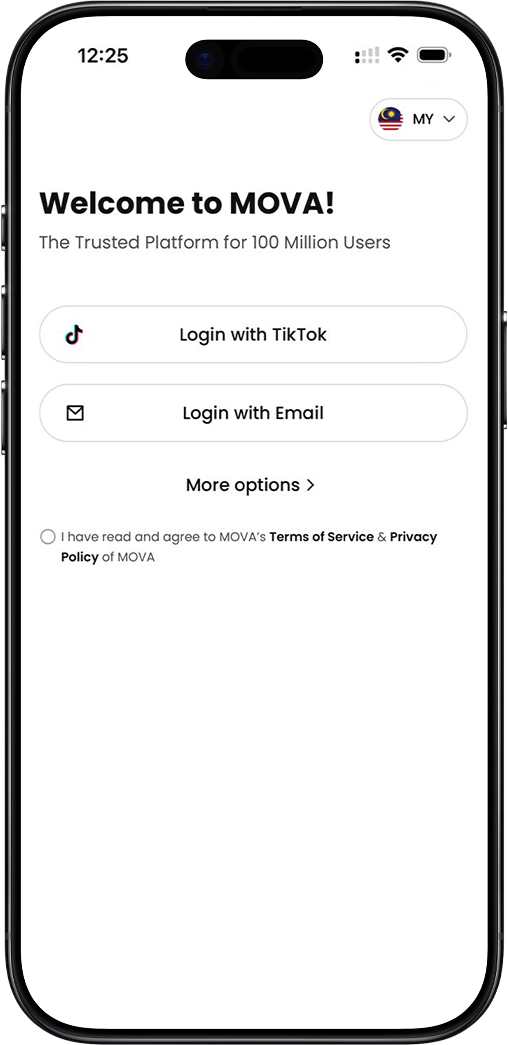
Welcome Back to MOVA – The Trusted Platform for 100 Million Users
Why You Need to Log In to MOVA
Your MOVA account gives you full access to your cashback dashboard, order tracking, withdrawal history, and exclusive promotions. Log in to MOVA to continue earning cashback every time you shop on Shopee, TikTok, Lazada, tiket.com, or Trip.com — all in one place, with no minimum spend and no point conversion required.
MOVA Login is Available via the MOVA App Only
Please note that MOVA account login is only available through the MOVA mobile app. To access your account, you will need to have the MOVA app installed on your mobile device. If you have not yet downloaded the MOVA app, please refer to the Download MOVA section below to get started.
How to Log In to Your MOVA Account – Step-by-Step Guide
Step 1: Open the MOVA App
Launch the MOVA app on your mobile device. You will be greeted with the Welcome to MOVA screen — the trusted platform for 100 million users. Make sure your country/region is set correctly. MOVA currently supports Malaysia (MY) and Indonesia. Tap the country flag icon at the top right corner to select or change your country/region, then tap Confirm to proceed.
Step 2: Choose Your Preferred Login Method
MOVA offers multiple convenient login options. Select the method that best suits you: (a) Login with TikTok — sign in quickly and securely using your existing TikTok account; (b) Login with Email — enter your registered MOVA email address and password to access your account; or (c) More Options — tap "More options" to reveal additional login methods, including login using your phone number.
Step 3: Login with Phone Number (via More Options)
If you prefer to log in using your mobile phone number, tap "More options" on the login screen. Select "Login using phone number," enter your registered phone number, and tap the Login button to proceed. You may be required to verify your identity via a one-time password (OTP) sent to your registered mobile number.
Step 4: Agree to MOVA's Terms of Service Privacy Policy
Before logging in, please ensure you have read and agreed to MOVA's Terms of Service and Privacy Policy. Tick the checkbox confirming your agreement before proceeding with any login method. By logging in, you confirm that you have read, understood, and agreed to MOVA's terms.
Step 5: Access Your MOVA Cashback Dashboard
Once you have successfully logged in, you will be directed to your personal MOVA cashback dashboard. From here, you can track your cashback earnings, view pending and completed orders, manage your withdrawal requests, and access exclusive promotions and offers available to MOVA users.
Don't Have the MOVA App Yet? Download It Now
MOVA App is Required to Log In
The MOVA login page is only accessible via the MOVA mobile app. If you have not yet downloaded the app, you will need to install it on your Android or iOS device before you can log in. Downloading the MOVA app is free and takes only a few minutes. Once installed, you can register a new account or log in to your existing MOVA account instantly.
Download the MOVA App
Visit our Download page to get the official MOVA app for your device. Scan the QR code or tap the download button to install the app and start earning cashback today.
Ready to Access Your MOVA Account?
Download the MOVA app, log in to your account, and start earning cashback on Shopee, TikTok, Lazada, tiket.com, and Trip.com today. Join over 100 million users who trust MOVA for their everyday shopping rewards.